
The MultiVariants alternative that sells the next discount
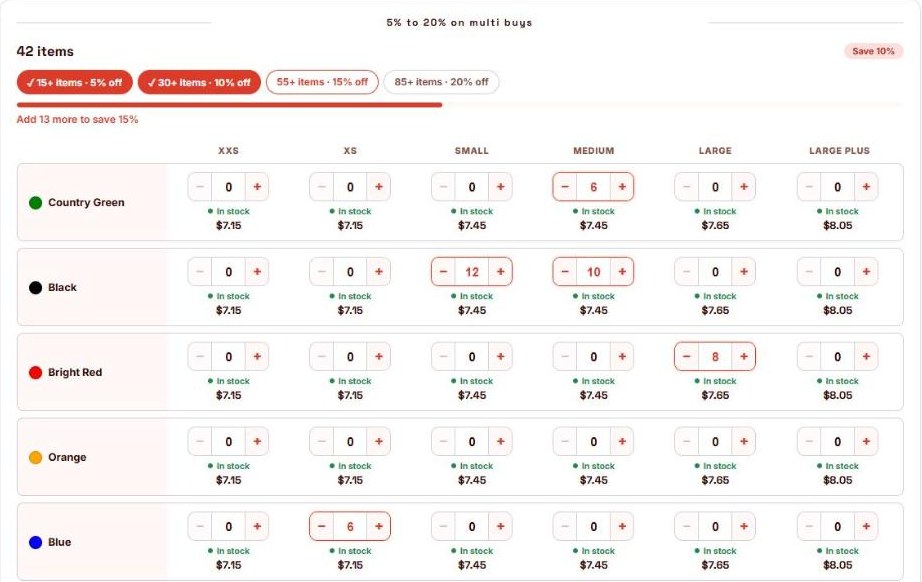
A bulk order table with every colour and size, stock and price in each cell, and the discount ladder built right in. Buyers see how close they are to the next tier, so they order more.
Everything a bulk order needs, in one app
Built for stores that sell in volume: trade buyers, team kits, uniforms and anything ordered in mixed colours and sizes.
The next discount, always in view
Milestone chips light up as the order grows, and a live line says "Add 13 more to save 15%". It's the nudge that turns a 42-unit order into a 55-unit one.
Discount ladder built in
Set 15 / 30 / 55 / 85 items for 5 / 10 / 15 / 20% off, mixed across every colour and size. No second discount app to install, pay for or keep in sync.
Start on the Free plan
The order table and its discounts are free up to 20 bundle orders a month. After that, $12.99 a month covers 500.
Prices Shopify guarantees
The discount is applied by Shopify at checkout and checked again on every cart change. No code to share, nothing to leak.
Retail offers in the same app
BOGO, quantity breaks, mix & match boxes, free gifts, a store-wide spend ladder and cart upsells. One app for trade and retail.
Set up with you
Tell us the product and your tiers, and the developer will help you set up your first order table for free.
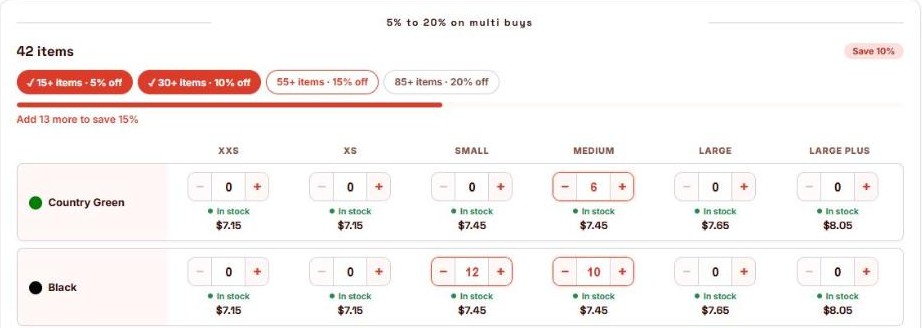
Your discount tiers, working inside the table
Most order forms list the tiers as text and leave buyers to do the maths. ZS Bundles shows every tier as a chip, ticks off the ones reached and counts down to the next.
- As many tiers as you need, by item count
- Every colour and size counts toward the same tier
- A "Save 10%" badge updates as quantities change
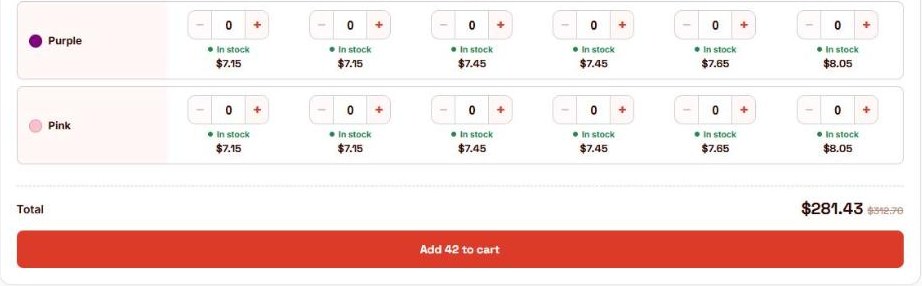
The whole order in the cart at once
Buyers type quantities or use − / +, see the total with the saving, and press one button. Each colour and size lands as its own cart line, so orders, stock and fulfilment stay exactly as you know them.
- Stock and price shown in every cell
- Sold-out variants greyed out automatically
- Minimum and maximum order size you choose
- Show it to every visitor, or only to customers tagged wholesale
What you get on each plan
| MultiVariants | ZS Bundles | |
|---|---|---|
| Colour × size order table | From the Standard plan ($12.99/mo) | Every plan, including Free |
| Milestone / volume discounts | Standard: through DiscountRay, a separate app. Built in from Professional ($29.99/mo) | Built in on every plan, including Free |
| Next tier shown live in the table | Not listed | Milestone chips, progress bar and "Add X more to save Y%" |
| BOGO, free gifts, spend ladder, cart upsell | Not listed | Included |
| Free plan | Variant list with quantity boxes | Full order table and discount tiers, up to 20 bundle orders a month |
MultiVariants and DiscountRay details as shown on their Shopify App Store listings on 16 October 2026.
Try it on one product, risk-free
Both apps can run at the same time, so you can compare before you change anything.
Install ZS Bundles and turn it on
One click on the app's home page adds it to your theme. Works with any theme.
Create a Mix & Match bundle, set Variants to Grid
Add the product, add your discount tiers, publish.
Compare on one product, then roll out
Leave your other products as they are, watch order sizes on the new table, and switch the rest when you're happy.
Questions
Can I keep my current app while I try it?
Can only my trade customers see the table and its prices?
Do my discounts need a code?
What does a product with only one option look like?
See the bulk order table live
Open the demo, type a few quantities and watch the discount climb.
